In today’s fast paced world, we all face the challenge of managing large amounts of information. Whether you are a student capturing lecture notes, a professional documenting work details, or part of a team handling multiple projects. It’s easy to become overwhelmed with scattered digital files, PDFs, and physical documents. Traditional methods like notebooks, loose papers, or even disorganized digital files no longer cut it. Notes get lost, documents pile up, and the search for the right file can waste valuable time.
This is where AxelaNote comes in as a solution designed to simplify your workflow. It’s not just another note taking tool but it’s a document annotation tool aimed at transforming the way we store, organize, and retrieve information. With AxelaNote, your notes become organized, easy to search, and ready when you need them. No more flipping through pages or endlessly scrolling through digital files to find what you need.
Having used this tool myself, I can confidently say it brings a breath of fresh air to the often chaotic world of information management. The platform allows you to capture ideas quickly, but more importantly, it helps you manage and retrieve them faster than ever before. It is designed to help you not just store data but to organize and retrieve it effectively, which makes your productivity soar. The key value lies in its ability to streamline workflow improvement by making digital notes more accessible and structured.
The digital age has introduced many new platforms, and AxelaNote is quickly standing out for its modern approach to note organization. It’s making waves because it’s not just about keeping your files in one place, it’s about making those notes meaningful and easier to manage. Whether you are working on academic notes, workplace notes, or even professional documentation, this tool can change how you handle documents forever. Let’s know more about this tool in the article!
What is AxelaNote?
AxelaNote is a digital note taking tool designed to make the process of organizing ideas and tasks easier. Unlike traditional note apps, it offers a structured approach to notes, allowing you to write, draw, and highlight on a digital layer that rests on top of your documents, leaving the original file untouched. Whether you’re working with PDFs or other document types, it provides the flexibility to manage your notes without the fear of altering the original content.
You can work on multiple layers of notes that are stacked layers on the same file. This makes it possible to share notes, hide notes, or keep them connected without making any permanent changes to your document. The ability to have connected notes means that your annotations and ideas stay relevant to the original file but are separated by the digital layer. This gives you the freedom to add personal notes or additional information as needed.
AlexaNote isn’t just for personal use; it is designed for both individuals and teams to help manage their workflow. It can be a productivity platform for students who need to stay organized, creators who want to capture ideas on the go, or teams that rely on organized workflows. It provides a flexible environment where ideas, tasks, and documents can be stored. Not just that but can be searched, and accessed seamlessly across different devices, ensuring your work is always at your fingertips.
The key feature of AxelaNote lies in its cloud syncing capabilities, which means that all your documents and notes are stored securely, accessible from anywhere, and updated in real time. It combines smart organization with intuitive usability, creating a centralized workspace where everything you need to stay productive is available in one place. Whether you are planning for the day, managing projects, or organizing your thoughts, AxelaNote ensures a smooth workflow with cross device syncing, making it the perfect tool for modern productivity.
For those who need more than just basic text storage, it offers a platform that allows you to take your notes to the next level. With structured note management, smart categorization, and an easy to use interface, the platform is designed to help you streamline your workflows and stay organized in a speedy and efficient manner. It’s the productivity solution for anyone who needs a reliable workspace for capturing information, organizing tasks, and managing ideas effectively.
In summary, AxelaNote is not just a note app; it’s a complete note taking system that helps individuals and teams manage information, organize ideas, and streamline workflows. Whether you’re storing notes, managing documents, or collaborating with others, it makes the process efficient, accessible, and organized.
The Problem with Traditional Note Taking and How AxelaNote Solves It
Information Fragmentation: The Struggle with Scattered Notes
Traditional note taking has many challenges. Handwritten notes often degrade over time, and paper notes can become difficult to read. Meanwhile, digital notes are often scattered across multiple apps, making it nearly impossible to consolidate them into one place. For example, you might store meeting notes in one app, project research in another, and reference documents in a third. When you need to pull them together, it becomes a tedious task. This is where information fragmentation happens, as notes and ideas are linked only to the original document and often get lost, making the context unclear.
PDF Restriction Barriers: The Struggle with Annotating Documents
Another problem is dealing with PDF restrictions. When you receive an important document with editing disabled, you can’t easily highlight key sections, add team questions, or mark up the document for further analysis. Your only options are to either print it or leave it untouched, both of which don’t work well. AxelaNote solves this by allowing you to annotate every file, regardless of who the creator is or the security settings.
Version Control Chaos: Managing Multiple File Copies
Collaboration also becomes a nightmare when dealing with email attachments. Once a file goes out for editing, multiple conflicting copies appear, creating confusion about the correct version. This results in wasted time and often causes errors, a clear example of version control chaos. However, AxelaNote allows feedback to stay in one document, so every comment from your team is visible without the need to manage multiple file copies.
Cognitive Load: The Mental Effort of Remembering Where You Saved Notes
When managing multiple notes, cognitive load can become overwhelming. You often have to remember where you saved important notes or content. This extra mental effort can hinder information recall. AxelaNote solves this by ensuring that your notes stay with the right content, so you don’t have to worry about forgetting or losing anything.
Review Inefficiency: The Time Wasted on Manual Document Review
Finally, review inefficiency is a major issue when working with documents. A 2026 government pilot in Japan is aiming for a 30% reduction in document checking time using annotation tools. AxelaNote speeds up the review process, improving efficiency and time saving in document workflows, making it the ultimate tool for handling the inefficiencies of traditional note taking.
System Requirements
When setting up Axelanote, it’s essential to ensure your device meets the system requirements to get the most out of its performance. First, the software runs smoothly on both Windows 10 and Windows 11, offering compatibility with these operating systems. For optimal device support, the Intel Atom x7-Z8700 is the minimum recommended processor, but if you’re looking for faster performance, the Core i5 is the best choice. Along with that, you’ll need at least 4GB of memory to run the software, though 8GB is ideal for smoother operation, ensuring better system performance and faster application speed.
The display plays a crucial role too. A 1280 x 1024 screen resolution is the minimum you’ll need, allowing for a decent visual workspace and good interface clarity. Axelanote is designed to work well with pen enabled devices like Surface Pro and Wacom, giving you the best handwriting experience. If you prefer to work with a mouse, that’s fine too, but for those who want digital writing and enhanced note taking, a stylus is recommended. Additionally, the app supports multi monitor setups, which is perfect for those who need an extended workspace.
In terms of software, Axelanote requires Acrobat Reader DC or Acrobat Reader 2017 for viewing and annotating PDF documents. You’ll need an Internet connection for license verification and software validation, so make sure you’re connected online when first using the app. Whether you’re working with large documents (up to 500 pages) or dealing with 1 square meter worth of content, Axelanote can handle it all, supporting up to 2,000 annotation objects per page. This makes it perfect for users who need to annotate documents, highlight text, and add comments or drawing objects with ease. The ability to handle these heavy tasks smoothly requires proper hardware and software alignment, ensuring that your workflow remains efficient.
Key Features of AxelaNote
Smart Organization and Fast Note Management
AxelaNote offers a strong range of features built around productivity, organization, and efficiency. Instead of working like a basic digital notebook, it behaves more like a complete knowledge management tool that adapts to different user needs. Its smart categorization, smart note organization system, intelligent organization, folders, tags, categories, filters, and quick search help users find information quickly without dealing with cluttered files, especially when managing large volumes of notes, documents, tasks, and projects.
AI Help, Writing Support, and Better Clarity
From my experience with note tools, the real value comes when the app saves time during the writing process, and this is where AI powered note assistance can make AxelaNote more useful. It can help users summarize long notes, generate ideas, improve content clarity, reduce manual effort, and support structuring notes in a cleaner way. With templates, customizable layouts, formatting tools, rich text formatting, headings, layout options, and better readability, users can prepare meeting notes, research documents, and daily planners with more consistency and less stress.
Cross Platform Access, Cloud Sync, and Data Protection
A good note app should not trap your work on one device, and AxelaNote handles this through cross platform accessibility across desktop, mobile, and web applications. Its cloud storage, cloud sync, synchronization, secure synchronization, and data continuity keep notes backed up across different devices, reducing the risk of data loss. With data security, encrypted storage, privacy focused architecture, and strong protection, the platform supports safer digital note management while keeping the user experience smooth.
Collaboration, Sharing, and Team Workflows
For teams, AxelaNote is not just about writing notes; it also supports collaboration, sharing options, team workflows, team members, remote teams, and organized workflows inside one platform. Features like shared access, real time editing, and permission controls make it easier to create, edit, and retrieve shared work without confusion. Its user friendly interface, minimal design, easy navigation, beginner friendly setup, and advanced features also reduce technical complexity, which helps users stay focused on effectiveness instead of fighting with the tool.
PDF Annotation, Layers, Stylus Support, and Data Export
Another useful side of AxelaNote is its advanced note creation interface for working with files and annotations. The non destructive overlay keeps notes on a separate layer, so restricted PDFs can be marked safely without changing the original file. Support for stylus input, handwriting, drawings, diagrams, automatic numbering, sequential labels, layer management, annotation layers, color coding, hide controls, CSV data extraction, structured data, analysis, and spreadsheets makes it practical for researchers, analysts, and users who need to organize findings in a professionally organized way.
AxelaNote vs. Traditional Note Taking Tools
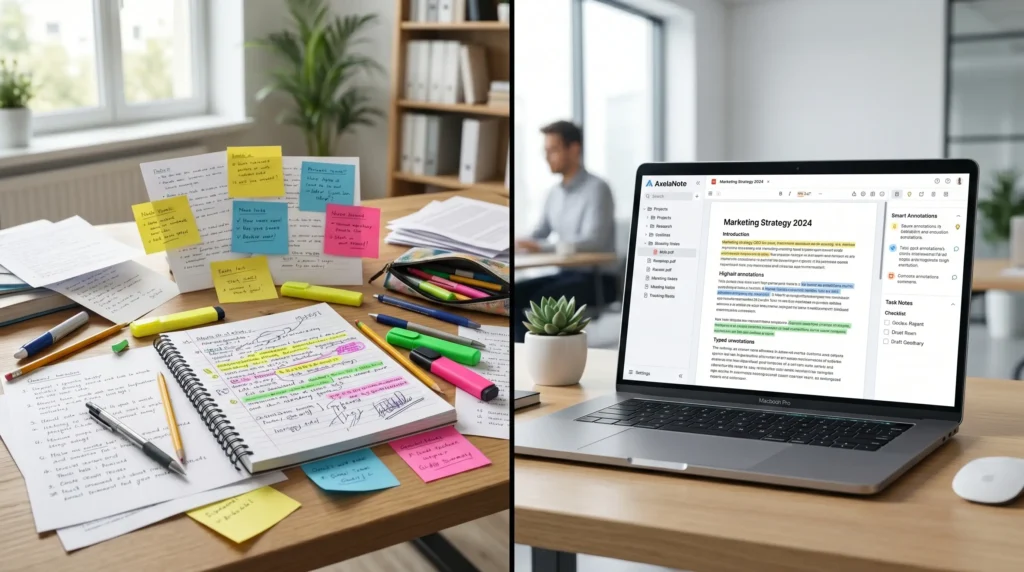
AxelaNote is not just another note taking app; it is a practical solution for smart note taking, manage documents, and better document management in the modern Technology space. While traditional note taking tools like OneNote, Notion, Evernote, and Google Keep are useful, they often focus on basic digital notes, quick notes, reminders, or basic note storage rather than serious PDF annotation, document review, and long term information management.
The Real Problem with Traditional Note Taking
Many users still depend on traditional methods such as notebooks, loose papers, paper notes, handwritten notes, scattered computer files, and multiple apps. A student may keep lecture notes in one app, a professional may save work details somewhere else, and teams may store meeting notes, project research, and reference documents in a third app. This creates an ongoing challenge because large amounts of information become hard to control, causing lost notes, document pile up, time waste, errors, and trouble finding the right file at the right time.
How AxelaNote Handles PDFs Better
The biggest strength of AxelaNote is that it works as a document annotation tool for PDFs, digital files, all PDFs, restricted PDFs, and restricted files. Many apps offer only basic annotation or even no annotation, especially when users face PDF restrictions, editing disabled, editing restrictions, and printing restrictions. With AxelaNote, users can annotate freely, highlight key sections, write, draw, highlight, mark it up, and add team questions without needing to print document files or leave untouched important material.
Original File Safety Makes It More Reliable
A major reason AxelaNote feels safer is its non destructive overlay system. It places a digital layer on the top of documents, so the original file, original document, and untouched file stay protected. Unlike tools that embed file changes or alter original file content, AxelaNote gives better original file safety because the original file never changed, and your notes connected to document do not alter original content.
Layer Management Gives Teams More Control
In my experience, messy feedback is one of the biggest reasons teams lose clarity. AxelaNote solves this with layer management, separate layer, annotation layer, multiple annotation layers, multiple color coded annotation layers, color code layers, and annotation layering. Users can show layers, hide layers, hide notes, share notes, and stack multiple layers on the same file, which makes collaboration, team feedback, team notes, comments, one document feedback, and separated layers easier to manage.
Better Version Control with Fewer File Copies
Old workflows often depend on email attachments, file editing, file history, and manual version tracking. This leads to version control chaos, multiple conflicting copies, duplicate files, duplicate file copies, version confusion, and uncertainty about the correct version. With AxelaNote, version control becomes cleaner because all feedback stays in one document, helping users avoid lost information, keep clear context, and reduce cognitive load.
A Cleaner Workflow for Students and Professionals
For professionals, students, researchers, and analysts, the value of AxelaNote is in its simpler workflow, efficient workflow, streamlined note organization, and structured organization. It turns messy ideas into clear notes, organized notes, structured notes, and ready notes that are easy to search with quick search and better retrieving information. Instead of flipping pages or scrolling forever, users get anytime access to the right content and saved notes.
Stylus and Handwriting Support Feel More Natural
Unlike apps with absent stylus support or limited writing options, AxelaNote offers stylus support, stylus input, optimized handwriting, natural handwriting experience, best handwriting experience, clean look, natural writing, drawings, and diagrams. It works with a mouse, stylus, pen enabled devices, Surface Pro, and Wacom, which makes it useful for people who prefer handwriting instead of typing every note.
Data Export and Review Features Add Practical Value
Another area where AxelaNote feels stronger than many traditional note apps is data handling. It supports CSV data extraction, CSV data export, structured annotation data, structured data, export data, and spreadsheets, making it easier to compile findings and perform analysis. This is useful for document checking time, review speed, review inefficiency, and document review, especially when compared with apps that offer no direct annotation export.
System Requirements and Document Capacity
The system requirements are also clear: OS, Windows 10, Windows 11, Processor, Intel Atom x7 Z8700, minimum processor, Core i5, recommended processor, Memory, 4GB minimum, 8GB recommended, Display, 1280 x 1024 minimum, Software, Acrobat Reader DC, Acrobat Reader 2017, Internet, and license verification. It also supports multi monitor setups, pages up to 1 square meter, documents up to 500 pages, each page, and 2,000 annotation objects, which makes it suitable for heavier documentation workflow and serious managing information tasks.
AxelaNote Compared with Notion, Evernote, OneNote, and Google Keep
Notion is strong for extensive customization, database features, complex project management, advanced workspace customization, and workspace tools, but it may feel like an overwhelming interface for beginners. Evernote has a long standing reputation, but AxelaNote feels like a fresh alternative and efficient alternative with a cleaner interface, modern workflow experience, improved usability, and modern note management. OneNote is useful for a notebook style structure and freeform note layouts, while Google Keep is better for simple sticky style notes and quick reminders.
Why AxelaNote Fits the Productivity Software Space
The real market fit of AxelaNote comes from its balance, function, simplicity, hassle free use, balanced solution, and advanced organization features. Many competitors focus either on complex customization or simple storage, but AxelaNote bridges the gap with a user friendly interface, structured functionality, speed, accessibility, intuitive navigation, efficiency, faster note management, and a system that is easier to use without a steep learning curve.
Price, Positioning, and Use Case
From a pricing angle, AxelaNote has a yearly price from $25.50 per user or $35.37 per device, while other tools may offer free tiers, paid plans, and prices from $8 to $14.99+. A direct comparison shows that AxelaNote is not trying to replace every app; instead, it works best for users who need minimal note taking, focused note taking experience, organized system, categorized system, note organization, note layout preference, deeper organization, structured documentation, long term note storage, knowledge management, comprehensive knowledge management system, note storage, scalable tool, and a powerful tool for serious documents.
Why Simplicity Matters More Than Ever
One of the major shifts in the field of digital tools is the growing preference for simplicity. Many people are fed up with complicated systems that require too much effort to understand. This is where Axelanote stands out. Its simple and easy design draws interest because it makes it easier for users to get on board and start using it without confusion. The tool is not only easy to maintain but also practical for everyday life, making it a solution today’s customers are actively looking for. A simple approach allows users to focus on their tasks without getting bogged down in complex processes, which is exactly what the modern digital user needs.
How AxelaNote Works (Step-by-Step)
Account Setup and Onboarding
Account setup in AxelaNote starts with a straightforward and user friendly onboarding process, where new users can create account access within minutes. The guided onboarding explains core features, basic preferences, workspace setup, workspace customization, and folder creation without heavy technical steps. In my experience, this kind of clean setup process reduces technical confusion, helps overwhelmed users with quick platform adaptation, and supports minimal learning effort for both beginners and advanced users.
Creating and Managing Notes
Once the platform is ready, users can create notes, use fast note creation, and capture ideas instantly through an intuitive interface. These notes can become edited notes, formatted notes, and updated notes in real time, making creating notes and managing notes smooth for personal use and professional use. This platform support gives strong productivity benefits because users can categorize content, attach files, and maintain organized documentation through structured note management.
Organizing Notes with Tags and Folders
The real value of AxelaNote appears in its simple workflow, structured workflow, and step-by-step functionality, where organizing notes becomes easier through tags, folders, a tagging system, and a folder based system. Tags help with quick filtering, while folders create a clear hierarchy for storing notes, content management, and handling large volumes of important information without losing track over time. This combination system builds structured organization, so users can organize notes, categorize notes, and manage notes as part of their routine integration.
Syncing, Exporting, and Backup
For daily usage, the syncing feature keeps everything automatically updated across connected devices, so switching devices between mobile and desktop feels smooth. Users can synchronize data, access the latest version, enjoy instant access, and depend on real time synchronization for better workflow continuity, fewer version conflicts, and fewer data inconsistencies. For safety, exporting options, backup options, and flexible exporting allow users to export notes in multiple formats for documentation, sharing, and offline storage, while automatic cloud backups add an extra layer of security for long term data safety, protected data, recoverable data, and protection from unexpected data loss.
AxelaNote Use Cases
Engineering and Construction
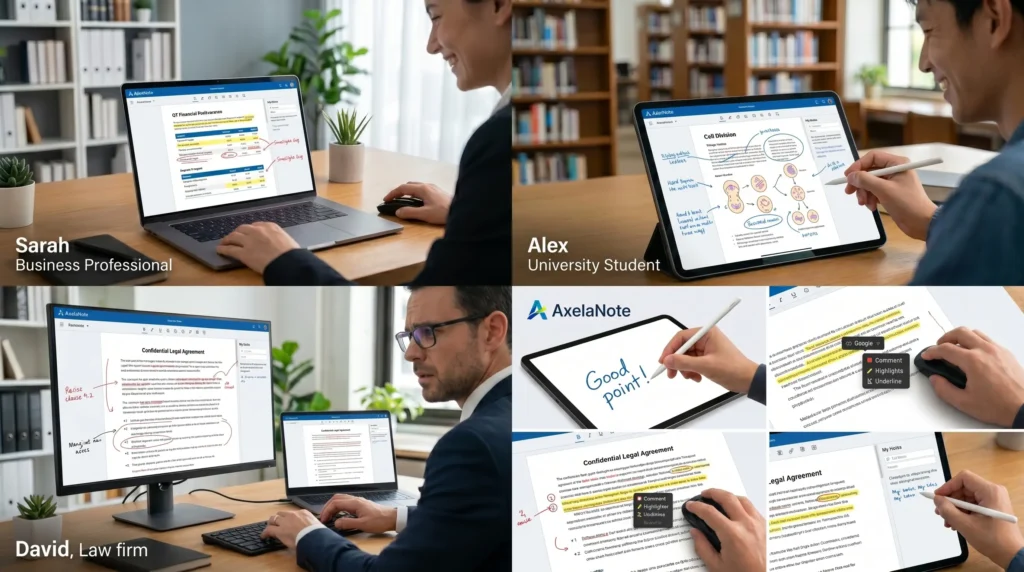
AxelaNote offers a wide range of use cases across different sectors. In engineering and construction, it allows teams to annotate blueprints digitally, ensuring that the original plans remain unchanged, while notes are always visible. Plan updates are automatically annotated, making it easier to track project revisions and coordinate design tasks. With technical drawings and blueprint markup, the digital plans are enhanced for seamless field reviews and design coordination.
Legal
For legal professionals, AxelaNote provides a secure space for lawyers to add private notes to documents. Sensitive thoughts and analysis can remain hidden, while the original file stays clean. This ensures confidential review and maintains file integrity throughout the legal workflow. Legal annotations can be added without compromising the original documents, enabling professionals to maintain a high level of confidentiality and organization.
Project Management
In project management, AxelaNote enables project managers to consolidate feedback from multiple teams into a single document. Each team’s notes are stored in separate layers with color coded layers, allowing for clear collaboration and workflow alignment. This results in better team communication, more organized reviews, and an efficient process for managing project documentation.
Academic
For students and researchers, AxelaNote offers the ability to add notes to PDFs, making it easy to search and link relevant information. The tagging and folder features allow users to categorize subjects, reduce study time, and enhance knowledge retention. This makes it a powerful tool for keeping academic work structured and accessible, enabling easy retrieval of key information later on.
Corporate Training
In corporate training, AxelaNote helps trainers provide digital handouts that employees can annotate directly, creating personalized references for each participant. This enhances employee learning and facilitates workplace training by allowing employees to refer back to their notes easily. The interactive handouts help with knowledge retention and serve as valuable resources for professional development.
Proven Results
The software has proven its value in document review, with a 2026 government project in Japan showing that AxelaNote made the process 30% faster while maintaining original files. The platform supports a wide range of users, adapting easily to both personal and professional environments, offering a structured system for information management, improving productivity, and fostering collaboration.
Students and Researchers
For content writers and bloggers, AxelaNote helps to manage content ideas, outlines, and drafts in one place. It streamlines the writing workflow by keeping all research organized, so writers can focus more on creativity rather than searching for scattered information. Structured note organization and easy editing features help maintain a smooth writing process and ensure that content management remains efficient.
Content Writers and Bloggers
Business professionals can use AxelaNote to handle meeting notes, reports, and internal documentation effectively. The software allows teams to collaborate and keep workflows aligned within a single platform, improving communication and reducing information gaps. Business insights can be easily accessed, ensuring that documentation and workplace coordination are seamless.
Business Professionals and Teams
For project managers and productivity focused users, AxelaNote is an essential tool for tracking tasks, plans, and project documentation. Its structured layout helps with planning workflows, setting priorities, and monitoring progress. With centralized information, AxelaNote allows for better control over timelines and deliverables, ensuring that project related information is always accessible and organized.
Freelancers and Remote Workers
Lastly, freelancers and remote workers benefit from AxelaNote’s cross device accessibility, allowing them to manage client notes, project details, and daily tasks from anywhere. The software ensures that important information is never lost, supporting remote productivity and maintaining a consistent workflow across different projects.
How to Decide If Axelanote Is Right for You?
- Focus on your requirements and what you need to achieve.
- If you prefer a simple concept and appealing design, Axelanote could be a good fit.
- For users seeking advanced features and options, consider exploring other software options.
- Concentrate on what can help you succeed, not just what’s current.
- Think about how the digital tool can enhance your productivity.
- Consider whether it aligns with your personal requirements.
- Ensure it provides the functionality needed for an efficient workflow
Alternatives to AxelaNote (Top Options)
Best Free Alternatives
When comparing free alternatives to AxelaNote, the first thing to check is whether the productivity tool fits real users with simple specific needs. Many note taking platforms focus on basic note taking, organization features, simplicity, accessibility, and quick note storage. These options are useful for casual users who want clean minimalist interfaces, fair pricing, smooth usability, and enough features without needing premium collaboration or structured knowledge management capabilities.
Best Premium Alternatives
For people with bigger workflow preferences, stronger productivity goals, and more required features, premium alternatives can be a better choice. These tools usually offer advanced customization, integrations, automation features, advanced productivity options, and deeper functionality for professional users, teams, and power users. From my experience, premium tools work best for complex workflows, large scale documentation, and comprehensive productivity systems, especially when budget allows a more complete setup.
AI Powered Note Taking Alternatives
In the competitive landscape of modern note taking and knowledge management software, AI powered alternatives are becoming popular because of their unique strengths. Many of them include AI support, automation, smart summaries, intelligent organization, and technological support for notes. These tools help users generate insights, structure content, enhance productivity, and improve both managing digital notes and optimizing digital notes in a faster, more organized way.
Conclusion
In conclusion, for professional teams that review documents regularly, AxelaNote gives a simple way to improve document review without disrupting the existing process. In my experience, the biggest problem in a busy workflow is not just reading files, but managing feedback, file sharing, and version control without losing track. AxelaNote helps with review efficiency, time saving, and a possible 30% reduction in checking time, which can return real hours in a week for teams working in engineering, law, education, or project management.
The strong part is that your original documents stay safe and documents intact, while the overlay system lets users annotate, share, and keep full control through process control and clear annotation layers. It also works with restricted PDFs, supports multiple feedback layers, and makes PDF review easier than old email-based collaboration, where version chaos often slows down team collaboration. For any serious workplace review, this makes collaboration cleaner, faster, and easier to manage through better document management.